


I’ve seen people panic after accidentally pressing “Format Card” or deleting an entire folder on a Canon EOS SD card. The good news: In many cases, deleted Canon photos can still be recovered, especially if you stop using the SD card immediately.
This guide explains realistic methods for recovering deleted photos from a Canon camera SD card! Before learning how to restore your photos, first check whether a deleted Canon photo can be recovered and why.
Can Deleted Canon Photos Really Be Recovered
Most deleted Canon camera photos are not erased instantly. When you delete images on a Canon DSLR, mirrorless camera, or compact camera, the storage system usually marks the files as “available space”. The actual image data often remains on the SD card until new files overwrite it.
That means recovery is often possible if:
- You stopped taking new photos
- The SD card is still detectable
- The card isn’t physically damaged
- You haven’t repeatedly formatted the card
This applies to many Canon models, including Canon EOS R6/R5, Canon EOS Rebel T7, Canon PowerShot G7 X Mark III, and more.
Pro Tips: What to do after losing Canon photos
- Stop Using the SD Card: This is the most important step. New photos can permanently overwrite deleted data.
- Remove the SD Card Safely: Take the card out of the Canon camera and avoid reconnecting it repeatedly.
- Use a Card Reader: Connect the SD card directly to your computer using a reliable reader.
- Avoid “Repair” Prompts: If Windows or macOS asks to repair or format the card, click Cancel first.
For most users, camera SD card recovery software is the fastest and safest option to recover deleted photos from a Canon camera.
How to Recover Deleted Photos from Canon Camera
Method 1. Recover Deleted Photos from Canon Camera with Software
EaseUS Data Recovery Wizard supports recovery from SD cards, microSD cards, CFexpress cards, Canon camera storage devices, formatted memory cards, RAW image formats like CR2 and CR3, and more.
Steps to recover deleted Canon photos:
Step 1. Insert the SD card into your computer using a card reader.
Step 2. Launch EaseUS Data Recovery Wizard and select the Canon SD card.
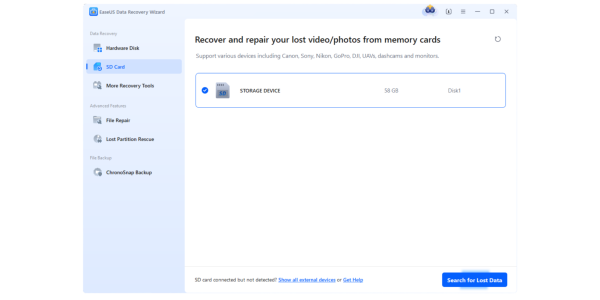
Step 3. EaseUS SD card recovery software performs a quick scan and a deep scan for deleted RAW/JPEG photos.
Step 4. Preview images before recovery to verify integrity. Then, save recovered photos to a different drive – not the same SD card.

Method 2. Restore Canon Photos from Backup
If you use cloud or local backup systems, recovering deleted photos from a Canon camera may be easier.
Check your Google Photos, Apple iCloud Photos, Adobe Lightroom Cloud, and other cloud drives. Then, check your external hard drive backups and NAS systems.
Some Canon users also enable automatic import via Canon Image. If enabled previously, your deleted images may already exist online.

Method 3. Check Hidden Photos Using CMD (Advanced)
If the SD card files became hidden due to corruption or malware:
Step 1. Open Command Prompt as Administrator
Step 2. Run the following command:
attrib -h -r -s /s /d X:\*.*
Replace X with your SD card drive letter.
This may restore hidden files, though it will not recover permanently deleted images.
Common Reasons Canon Camera Photos Get Deleted
Photographers usually lose images because of one of these situations:
- Accidental deletion: Images removed directly in-camera
- SD card formatting: Entire card appears empty
- File system corruption: Camera says “Card Error”
- Interrupted transfer: Photos disappear during import
- Virus or malware: Hidden or inaccessible images
- Using an SD card in multiple devices: Metadata conflicts damage files
One Reddit user described losing an entire wildlife shoot after accidentally formatting a Canon SD card before backup. Situations like this are more common than people think.
FAQ: Recover Deleted Photos from a Canon Camera
- Can I recover permanently deleted photos from a Canon camera?
Yes. Even permanently deleted photos may still exist on the SD card until overwritten.
- What is the best software to recover deleted Canon photos?
Many photographers use EaseUS Data Recovery Wizard because it supports Canon RAW files, formatted SD cards, and deep scanning.
- Can I recover photos from a damaged Canon SD card?
If the card is logically corrupted but still detectable, recovery is often possible. Physically broken cards may require professional recovery services.
- Does formatting a Canon SD card erase photos forever?
Not always. Quick formatting usually leaves recoverable image data behind until overwritten.
Final Thoughts
Recovering deleted photos from a Canon camera is absolutely possible in many real-world situations — especially when you act quickly and avoid reusing the SD card.
For accidental deletion, formatting, or RAW image recovery, tools like EaseUS Data Recovery Wizard remain one of the simplest options for non-technical users.
The biggest mistake people make is continuing to shoot after discovering the loss. If you stop using the card immediately, recovery odds are usually much higher.