


Ever wondered what if your SD gets corrupt or damaged all of a sudden? A damaged SD card can be a horrifying experience, especially when it contains your memorable photos and video files. Whether you have ejected the SD card improperly or there is a virus or malware attack, losing important photos due to SD card damage can be frustrating and disheartening.
Fortunately, several SD card recovery methods are available online that you can try to restore data lost from an SD card. Just go with this guide on how to recover photos from damaged SD cards to get your deleted photos back.
Common Reasons for Damaged SD Card
Understanding the exact cause of your SD card damage can help you identify adequate photo recovery approaches. Some main reasons why SD card gets damaged are:
Improper Handling: If you are not handling the SD card properly, this might physically damage the card and make the stored files inaccessible.
Water or Heat Exposure: SD cards are prone to water or extreme heat. High temperature, water spills, and moisture can damage the card.
File System Corruption: Sometimes, the SD card’s file system gets corrupted due to improper file transfers, formatting, or unexpected power outages.
Malicious Programs: Attack by malicious software like viruses or malware can cause data corruption or render the card unusable.
Bad Sectors: Due to the continuous usage of SD cards for a long time, they fail or result in unreadable and damaged sectors.
Overloading: Problems with the functionality and performance of the SD card may arise if it is filled beyond its storage capacity.
Improper Removal: Removing the SD card without properly ejecting it using the Safely Remove or Eject option can cause logical corruption.
How do I Recover Photos from Damaged SD Cards?
Now that you are familiar with the causes of your damaged SD card, it’s time to apply adequate SD card recovery methods to restore lost photos. Before you proceed with any of these methods, immediately stop saving new files on the card. Continuous usage could overwrite the deleted files and make the recovery more complex.
Let’s discuss different methods for photo recovery from corrupted SD Card in detail:
Method 01: Use Third-Party Photo Recovery Software
Recovering lost photos using any professional photo recovery software like Stellar Photo Recovery is a quick and easy approach. Whether your photos are deleted due to SD card corruption, formatting, virus or malware attack, this all-in-one photo recovery software can easily recover them. It offers a user-friendly interface and supports recovery of lost photos in a few simple steps.
Before knowing how to recover photos from damaged SD cards using the Stellar Photo Recovery software, here are its features:
Apart from photos, you can easily restore deleted video and audio files of various formats.
It can easily recover multimedia files deleted from several storage devices, including HDDs, SD cards, memory cards, flash drives, etc.
The tools offer both Quick scan and Deep scan recovery options. If the quick scan fails to provide the desired result, you can opt for the Deep scan option to perform comprehensive scanning of the selected drive.
It allows you to preview the recoverable files after scanning the storage device.
Follow the below steps carefully to discover how to recover photos from damaged SD cards using the Stellar Photo Recovery tool:
Step 1: Firstly, connect the SD card where your deleted photos were earlier stored to your computer. Also, download and install the Stellar Photo Recovery software on that device.
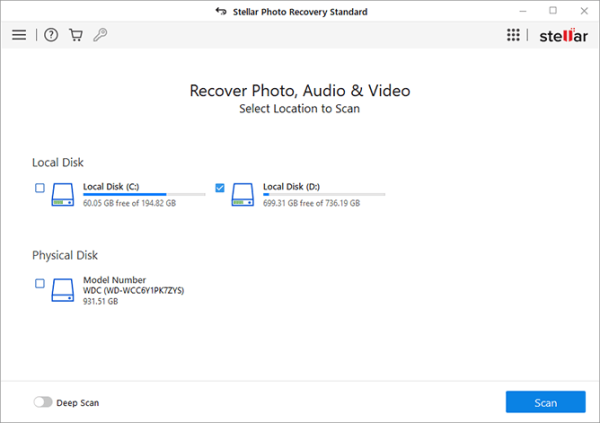
Step 2: Launch the software, select the storage drive that you need to scan and click the Scan button.
Step 3: After completion of the scanning process, preview the recoverable files and choose the photos you wish to recover.
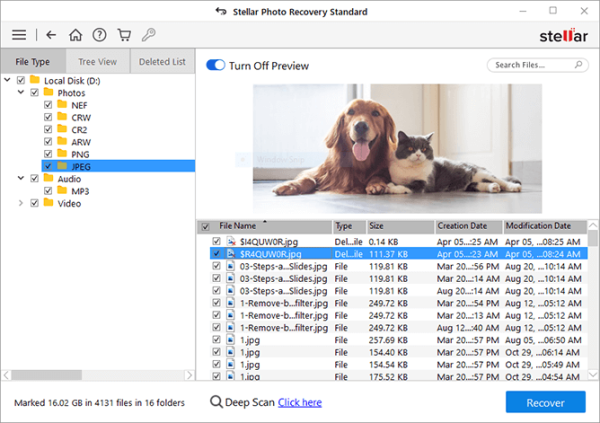
Step 4: Click the Recover button to save selected files at the desired location on your PC.
Method 02: Recover Photos from Corrupted SD Card via CHKDSK
System corruption is also one of the main reasons for photo loss from a corrupted SD card. In such a case, you can run the CHKDSK command to recover the content deleted from the damaged SD card after fixing it. All you have to do is:
Type CMD in the search box of your desktop and right-click on Command Prompt from the context menu. Select the “Run as administrator” option.
Now, type the command: chkdsk X: /r and press Enter (replace X with the letter assigned to your SD card).
Wait till the process completes.
Note: This method doesn’t allow you directly to recover lost files. It fixes SD card corruption to some extent, making you able to access the stored files and folders.
Method 03: Assign a New Drive Letter
Assigning a new drive letter can help you easily fix the access issues caused by logical errors or conflicts. It may also help you restore the files stored on the SD card without risking data overwriting. Follow the below-given steps to assign a new drive letter:
Insert the SD card into your computer using a card reader.
Now, right-click on “This PC” > “Manage” and select Disk Management.
Locate the SD card from the list of drives.
Right-click on the SD card and select the “Change Drive Letter and Paths” option.
Click Change and assign a new letter from the drop-down menu.
Once done, click OK to conclude the process and check if the card is accessible.
Final Thoughts
Losing precious photos can be distressing, but the aforementioned methods for photo recovery from a corrupted SD card can help you easily restore your lost photos. Begin by identifying the exact cause of the damage, then use appropriate tools and techniques to restore lost pictures. If you have any previously created backups, it can be helpful. If not, use third-party SD card recovery software or any of the above photo recovery methods to recover your lost pictures. Stay proactive and prepared to ensure your digital assets remain secure.
Frequently Asked Questions (FAQs)
Is it possible to recover photos from a physically damaged SD card?
Yes, but recovering photos from a damaged SD card often requires professional data recovery techniques or third-party photo recovery software such as Stellar Photo Recovery.
How long does photo recovery take?
The exact duration to recover photos from any storage device ranges from a few minutes to several hours, depending on the card’s size and damage extent.
How to repair my damaged SD card to restore photos from it?
You can fix damaged SD cards for free using the built-in CHKDSK utility. Or seek professional help for physically damaged SD cards.